 ErgoRated
Hbada E3 Ergonomic Chair Review — A highly innovative chair packed with unique features that ultimately trips over basic ergonomic fundamentals
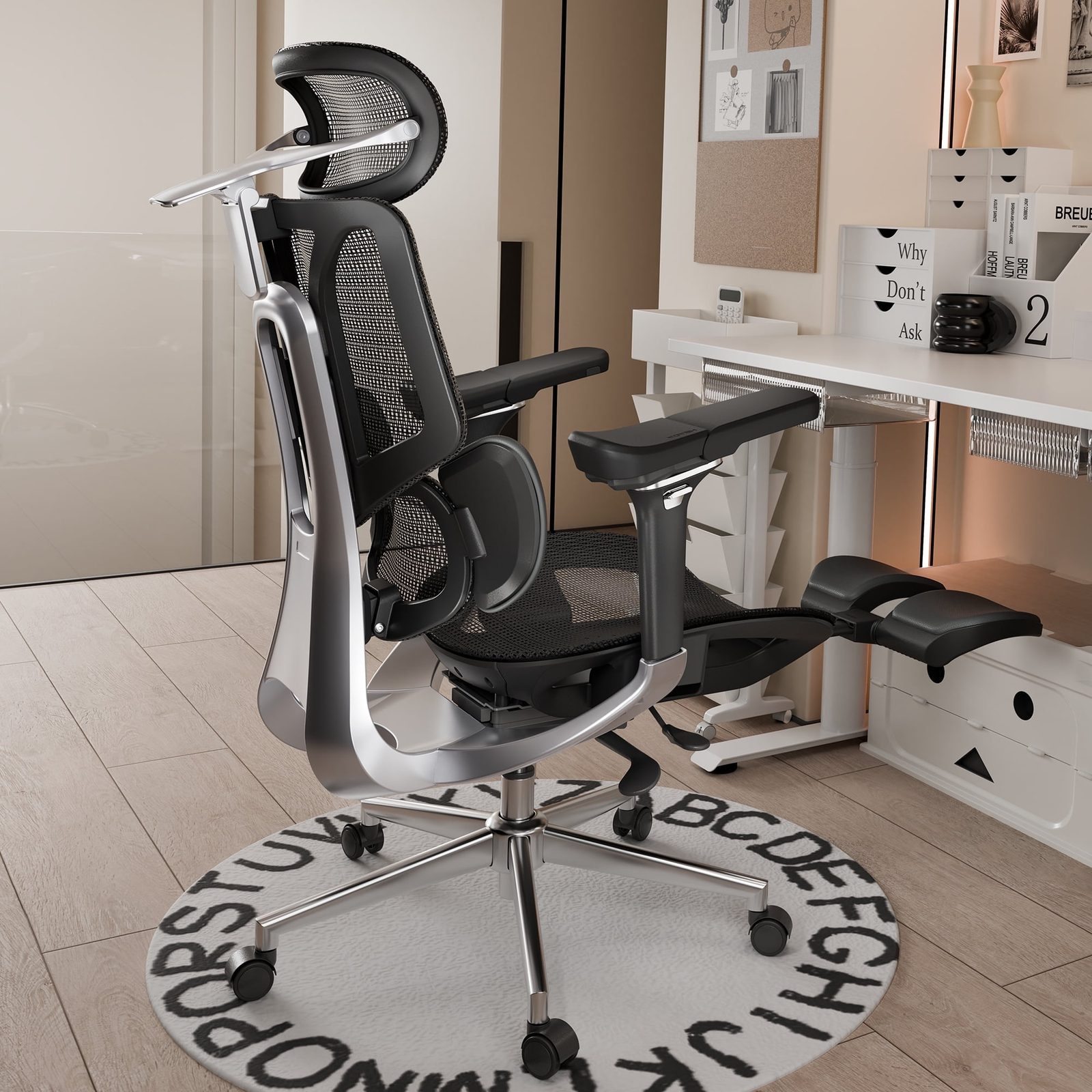
⚡ TL;DR
The chair excels at relaxation, offering a superb footrest, massive headrest, and unique upward-tilting arms perfect for holding a tablet or controller. However, the lack of recline tension control, high minimum armrest height, and painful plastic frame exposure when adjusting se
◈ Verdict: Depends on Use Case
Pros
- +Excellent, sturdy footrest that is genuinely comfortable for lounging and napping
- +Unique upward-tilting armrests that are perfect for mobile gaming and tablet use
- +Highly adjustable, massive 4-way headrest
- +Breathable, supportive mesh seat without an uncomfortable hard front pad
Cons
- −Armrests do not go low enough, preventing users from sliding them under a desk
- −Recline mechanism lacks tension control, forcing users fully upright or fully reclined
- −Extending the seat depth exposes a hard plastic frame that digs painfully into the tailbone
Alex Rivera
Published May 2, 2026
$229–$499
Price may vary. Updated regularly.
Hbada's E3 ergonomic chair might be the ultimate power-napping station, but one painful plastic flaw could ruin your workday. It is a masterclass in "feature creep" that manages to be both the most comfortable place in your office to take a break and the most frustrating place to actually get work done.
What you're actually getting
When you first unbox the Hbada E3, it looks like a prop from a sci-fi film. It’s undeniably sleek, and for the first hour, you’ll be convinced you’ve found a bargain. The mesh is breathable, the headrest is massive, and the footrest is arguably the best implementation I’ve seen on a sub-$600 chair. It’s sturdy, intuitive, and genuinely makes the chair a viable spot for a quick midday recharge.
However, once you settle into a standard eight-hour workday, the cracks start to show. The biggest offender is the seat depth adjustment. When you slide the seat forward to accommodate your legs, you expose a hard plastic frame that sits right at the edge of the seat. If you aren't careful, this frame digs directly into your tailbone or the back of your thighs. As Ahnestly noted in his review, the chair’s "hug" can quickly turn into a literal pain in the side, especially if you have a wider frame.
The recline mechanism is another point of contention. There is no tension control to speak of. You are either locked in a rigid, upright position or you are leaning back into a full recline. As BTODtv pointed out, "I cannot leave the chair unlocked otherwise it forces me either fully upright or fully reclined." This lack of nuance makes it impossible to find that "sweet spot" for focused typing, forcing you to constantly fight the chair’s internal logic rather than letting it support your natural posture.
Performance — what reviewers actually measured
| Metric | Value | Context |
|---|---|---|
| Assembly time | ~30 mins | Varies wildly based on your patience with the base |
| Max user height | 5'9" - 5'10" | Taller users will find the headrest hits the shoulders |
| Price tiers | $349 - $699 | Depends on the Air, Pro, or Ultra trim |
Where it actually wins
If your primary goal isn't spreadsheet management but rather mobile gaming or tablet consumption, this chair is a revelation. The upward-tilting armrests are the E3’s "killer app." By angling them inward and upward, you create a perfect cradle for your elbows while holding a Nintendo Switch, a Steam Deck, or an iPad. It’s a feature I didn't know I needed until I used it, and it makes the E3 a top-tier choice for a secondary "media" chair.
The headrest is equally impressive. Most ergonomic chairs treat the headrest as an afterthought—a small, wobbly piece of plastic that hits you in the shoulder blades. The E3’s 4-way adjustable headrest is massive and actually stays where you put it. When you combine that with the robust, well-engineered footrest, you have a setup that is genuinely superior to many high-end recliners. If you work in a hybrid capacity where you spend half your time on a phone or tablet, the E3 provides a level of comfort that most "serious" office chairs simply cannot match.
Where it falls short
The E3 fails the "desk worker" test in two critical ways: armrest height and overall ergonomics. The armrests are physically incapable of going low enough to slide under a standard 29-inch desk. If you’re the type of person who likes to pull your chair right up to the edge of your workspace, you’re going to be constantly bumping into your desk. It’s a massive oversight for a chair marketed as an "office" solution.
Furthermore, the side flaps on the backrest are a polarizing design choice. While they are meant to provide a "hugging" sensation, they often feel restrictive. If you have any width to your torso, these flaps don't provide support—they provide pressure. As Ahnestly put it, "This feels like I'm getting a hug... a little too much of a hug. I just feel fat." When you combine that with the painful plastic frame exposure during seat depth adjustment, the chair starts to feel like it was designed by someone who has never actually spent a full day working at a desk.
Should you buy it?
Buy if you
- Are a mobile gamer or tablet user who needs upward-tilting armrests.
- Value a high-quality, sturdy footrest for breaks and power naps.
- Are under 5'9" and want a chair that feels like a cockpit.
Skip if you
- Need your armrests to slide under your desk to save space.
- Are taller than 5'10", as the frame will likely feel cramped.
- Spend 8+ hours a day doing intensive keyboard-and-mouse work.
The Hbada E3 is a lounging and mobile gaming dream, but its ergonomic flaws make it a tough sell for serious desk workers.
Sources consulted
- TechMagnet — HBADA E3 Ergonomic Office Chair - Review After 6 Months - Pros & Cons (Honest Review)
- BTODtv — Which Hbada E3 Series Chair is The Best?
- BTODtv — Which $600 Mesh Chair is Better? Hbada E3 vs Hinomi H1
- Ahnestly — Hbada E3 Pro - King of Lounging Or Overhyped?
Synthesis combines independent reviews above. Verdicts and quotes attributed to original creators. Affiliate disclosure: we may earn a commission from qualifying purchases via Amazon links.
Products covered in this review
Frequently Asked Questions
Is the Hbada E3 Ergonomic Chair worth buying?
The chair excels at relaxation, offering a superb footrest, massive headrest, and unique upward-tilting arms perfect for holding a tablet or controller. However, the lack of recline tension control, high minimum armrest height, and painful plastic frame exposure when adjusting seat depth make it frustrating for standard keyboard-and-mouse productivity.
Who is the Hbada E3 Ergonomic Chair best for?
Mobile gamers, tablet users, and people who want a highly adjustable chair primarily for lounging, reclining, and power napping.
Who should skip it?
Traditional desk workers, taller users over 5'10', and anyone who needs their armrests to slide under a standard desk.