 ErgoRated
Logitech Ergo K860 Wireless Ergonomic Keyboard Review — A premium ergonomic keyboard successfully cures typing fatigue but introduces a surprising new problem with its massive footprint
⚡ TL;DR
The Logitech Ergo K860 delivers exceptional typing comfort, seamless multi-device switching, and incredible battery life. However, its premium price tag makes the lack of backlighting sting, and its massive footprint can push your mouse uncomfortably far away.
✓ Verdict: Buy
Pros
- +Exceptional ergonomic comfort that genuinely reduces wrist and forearm pain
- +High-quality, responsive low-profile keys with a satisfying typing feel
- +Seamless multi-device connectivity for up to three devices via Bluetooth or USB receiver
- +Incredible battery life lasting up to 18 months on two standard AAA batteries
- +Excellent built-in wrist rest with comfortable, dual-layer foam and palm lift feet
Cons
- −Complete lack of key backlighting, which is disappointing at this premium price point
- −Massive footprint pushes the mouse too far to the right, potentially causing shoulder strain
- −Wrist rest is non-detachable, meaning the whole keyboard must be replaced if it wears out
- −High price tag compared to standard keyboards and entry-level ergonomic options
Alex Rivera
Published May 2, 2026
$149–$179
Price may vary. Updated regularly.
Logitech's ergonomic masterpiece might cure your wrist pain, but its massive size could ruin your mouse posture. It’s a classic trade-off: you gain a keyboard that feels like a cloud for your palms, but you lose the desk real estate required to keep your mouse within a healthy reach.
What you're actually getting
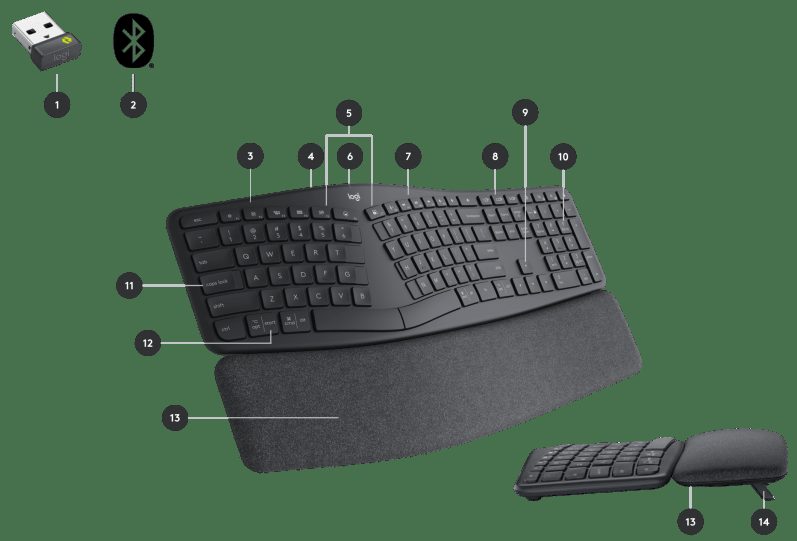
After using the Ergo K860 for an extended period, it’s clear that Logitech prioritized long-term comfort over modern bells and whistles. The split, curved keyframe isn't just a gimmick; it forces your wrists into a neutral, natural alignment that feels significantly less taxing after an eight-hour shift. As Hardware Canucks noted, "I might have to end up ditching my entire mechanical keyboard collection because this is the most comfortable keyboard I've tried yet."
The typing experience is remarkably consistent. The low-profile keys have a soft, tactile bump that’s quiet enough for an open office but responsive enough to keep your speed up. You aren't getting the clicky satisfaction of a high-end mechanical board, but you are getting a device that disappears under your fingers. The dual-layer foam wrist rest is the real star here—it’s firm enough to support your weight but soft enough to prevent the pressure points that usually lead to mid-day soreness.
However, the "premium" label feels slightly misplaced when you look at the feature set. You’re paying for the R&D behind the shape, not for cutting-edge tech. There is no backlighting, which is a genuine frustration if you work late into the evening. Furthermore, the non-detachable wrist rest is a ticking time bomb for cleanliness. While the fabric is stain-resistant, it will eventually show its age, and because it’s fused to the chassis, you can’t simply swap it out for a fresh one.
Performance — what reviewers actually measured
| Metric | Value | Context |
|---|---|---|
| Price | $119 - $130 | Premium, but often discounted |
| Battery Life | 18 months | Powered by 2x AAA batteries |
| Connectivity | 3 devices | Seamless Bluetooth/USB switching |
| Layout | Split/Curved | Requires touch-typing proficiency |
Where it actually wins
The K860 shines in its reliability and connectivity. If you juggle a laptop, a desktop, and a tablet, the Easy-Switch buttons are a godsend. You can jump between devices instantly without fumbling with settings, and the connection is rock-solid. It’s the kind of gear that, as Michael J Long put it, "is easy to recommend because it always works."
The battery life is another massive win. By opting for two standard AAA batteries rather than a rechargeable lithium-ion cell, Logitech has avoided the inevitable "battery death" that plagues most modern peripherals after three or four years. You’ll get roughly 18 months of juice, and when it finally dies, you just pop in new batteries and keep going. It’s a refreshing, no-nonsense approach to hardware longevity.
Where it falls short
The biggest issue is the footprint. This board is enormous. Because of the integrated number pad and the wide, curved design, your mouse is pushed significantly further to the right than it would be on a compact or tenkeyless board. If you’re a heavy mouse user, this creates an awkward reach that can lead to shoulder and neck strain—the very things you’re trying to avoid by buying an ergonomic keyboard in the first place. As Pocket-lint pointed out, "In my completely perfect world this would be a tenkeyless keyboard without the number pad."
Then there is the learning curve. If you aren't a touch-typist, the split layout will feel like trying to write with your non-dominant hand. You will make mistakes, you will get frustrated, and you will likely want to throw it out the window for the first 48 hours. If you’re a "hunt-and-peck" typist, this keyboard is not for you; the layout is designed specifically to force your hands into a specific, ergonomic posture that doesn't accommodate non-standard finger placement.
Should you buy it?
Buy if you
- Suffer from wrist or forearm fatigue during long typing sessions.
- Are a proficient touch-typist who can adapt to a split layout.
- Need to switch between multiple computers or tablets throughout the day.
- Value long-term hardware reliability over flashy features like RGB or rechargeable batteries.
Skip if you
- Work in low-light environments and rely on backlit keys.
- Have limited desk space or use your mouse heavily (the width is a dealbreaker).
- Are a "hunt-and-peck" typist who hasn't mastered touch-typing.
- Prefer the tactile, clicky feedback of mechanical switches.
A supremely comfortable ergonomic keyboard that saves your wrists, provided you have the desk space and don't need backlighting.
Sources consulted
- Hardware Canucks — Logitech Ergo K860 Review - My First Ergonomic Keyboard!
- Michael J Long (mjustinlong) — BEST Ergo Keyboard??? Logitech K860 - Long Term Review
- Pocket-lint — My new favourite keyboard! Logitech ERGO K860 review
- NateDesigns — I Tried Every Kind of Ergonomic Keyboard for 1 Year to Fix My Carpal Tunnel
Synthesis combines independent reviews above. Verdicts and quotes attributed to original creators. Affiliate disclosure: we may earn a commission from qualifying purchases via Amazon links.
Products covered in this review
Frequently Asked Questions
Is the Logitech Ergo K860 Wireless Ergonomic Keyboard worth buying?
The Logitech Ergo K860 delivers exceptional typing comfort, seamless multi-device switching, and incredible battery life. However, its premium price tag makes the lack of backlighting sting, and its massive footprint can push your mouse uncomfortably far away.
Who is the Logitech Ergo K860 Wireless Ergonomic Keyboard best for?
Heavy typists and office workers experiencing wrist pain who touch-type across multiple devices.
Who should skip it?
Night owls who need backlit keys, hunt-and-peck typists, and mouse-heavy users with limited desk space.