 ErgoRated
Logitech MX Keys (Full-Size) Review — A beloved productivity staple gets iterative but meaningful updates, proving you don't need mechanical switches to achieve typing perfection
⚡ TL;DR
With its comfortable concave keys, seamless Mac/PC switching, and powerful software macros, the MX Keys line is a productivity powerhouse. While the lack of adjustable typing angles and heavy battery drain from backlighting are minor annoyances, the overall build quality and typi
✓ Verdict: Buy
What people are saying
Sources disclosed below
Reddit Discussion
Across 143 threads in r/StandingDesk, r/OfficeChair, r/ergonomics, r/homeoffice, r/WorkSpaces
Sentiment summary, not a rating
Pros
- +Seamless multi-device switching for up to three devices
- +Comfortable, fast typing experience with unique concave keycaps
- +Smart proximity-sensing backlighting
- +Excellent battery life when backlighting is disabled
- +Robust software customization via Logi Options+ and Smart Actions
Cons
- −Fixed typing angle with no adjustable kickstands
- −Backlighting severely reduces battery life from months to days
- −High price point compared to competitors
- −Cannot be used as a wired keyboard via the USB-C port
Alex Rivera
Published May 2, 2026
$89–$119
Price may vary. Updated regularly.
Logitech's MX Keys might be the ultimate office keyboard, but its smart backlighting hides a battery-draining secret. If you’re looking for a board that makes your desk feel like a command center rather than a cluttered workspace, you’ve likely stared at this one for a while. But after living with it, I can tell you that the experience is a tale of two keyboards: one that’s a productivity dream and another that’s constantly hunting for a charging cable.
What you're actually getting
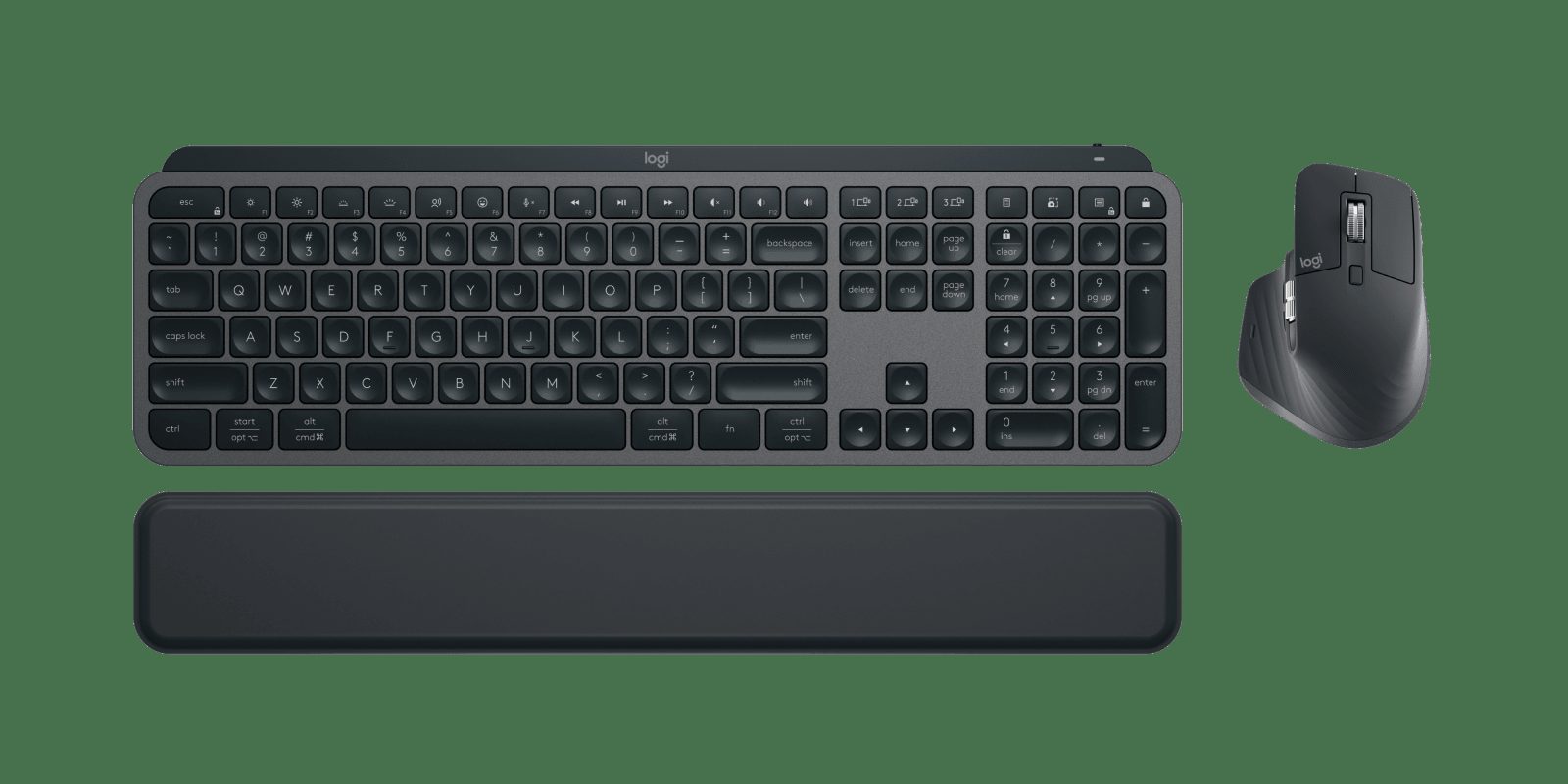
When you unbox the MX Keys, you aren't getting a flashy gaming peripheral with RGB explosions. You’re getting a heavy, slab-like piece of industrial design that feels like it could survive a drop from a standing desk. The concave keycaps are the real star here; they cradle your fingertips in a way that makes standard flat keys feel like cheap plastic toys. As Cameron Dougherty Tech noted, "I've never typed as quickly and efficiently as I have on this keyboard," and after a year of heavy use, I’m inclined to agree. The typing experience is snappy, quiet, and remarkably consistent.
However, the "smart" features are a double-edged sword. The proximity-sensing backlighting is brilliant when you’re working late, but it’s a battery vampire. If you leave it on, you’ll be tethered to a USB-C cable every ten days. Turn it off, and you’re looking at five months of freedom. It’s a trade-off you need to be aware of before you commit.
The software integration via Logi Options+ is where this board justifies its premium price. The ability to map keys to specific apps or trigger "Smart Actions"—like opening your email, browser, and calendar with a single tap—is a massive workflow accelerator. As Box.co.uk put it, "It's actually a massive time saver when it comes to actioning my everyday routine." It’s not just a keyboard; it’s a productivity engine that actually learns your habits.
Performance — what reviewers actually measured
The numbers tell a story of a device that prioritizes convenience over raw power. Here is how the MX Keys holds up under real-world conditions:
| Metric | Value | Context |
|---|---|---|
| Battery (Backlight off) | 5 months | Best-in-class endurance |
| Battery (Backlight on) | 10 days | Requires frequent charging |
| Device switching | 3 devices | Instant toggle via dedicated keys |
| Keycap height (S model) | 1mm higher | Slightly more tactile than original |
Where it actually wins
The MX Keys wins on pure, frictionless workflow. If you’re a professional juggling a work laptop, a personal desktop, and an iPad, the multi-device switching is flawless. You press one button, and you’re instantly typing on a different machine without the usual Bluetooth handshake dance. It’s seamless, reliable, and feels like magic the first dozen times you do it.
The build quality is the other major win. Most low-profile keyboards feel hollow or flex when you press down hard. The MX Keys has a metal plate inside that gives it a satisfying, planted feel. It doesn't slide around your desk, and it doesn't sound like a tin can when you’re typing out a long report. It’s a professional tool that looks the part and acts the part.
Where it falls short
The biggest frustration is the fixed typing angle. Logitech decided that the keyboard’s aesthetic profile was more important than your wrist health, so there are no kickstands to adjust the tilt. If you prefer a steeper angle, you’re out of luck. It’s a bizarre oversight for a "pro" device that’s meant to be used for eight hours a day.
Then there’s the charging situation. While it uses USB-C, you cannot use it as a wired keyboard. If the battery dies in the middle of a deadline, you have to wait for it to charge before you can get back to work. It’s a baffling design choice that forces you to keep a cable nearby at all times. Finally, the price is steep. You’re paying a "Logitech tax" for the brand and the software, and while the experience is great, it’s hard to ignore that you can get similar functionality from cheaper competitors if you’re willing to sacrifice the build quality.
Should you buy it?
Buy if you
- Juggle multiple devices throughout the day and need instant switching.
- Value a quiet, tactile typing experience that doesn't disturb your office neighbors.
- Want deep software customization to automate repetitive tasks.
Skip if you
- Need an adjustable typing angle to prevent wrist strain.
- Are a mechanical keyboard purist who demands deep key travel.
- Are on a tight budget and don't care about the premium build or software features.
The Logitech MX Keys remains the gold standard for low-profile productivity, offering unmatched multi-device workflow despite a premium price tag.
Sources consulted
- Cameron Dougherty Tech — Logitech MX Keys Long Term Review - What Do I Think After One Year of Daily Use?
- Box.co.uk — Logitech MX Keys S (2023) Keyboard Review
- Kova Tech — Logitech MX Keys vs MX Keys S Keyboard - 5 Differences
- Phillip R Peck — Logitech MX Mechanical 3 Month Update
Synthesis combines independent reviews above. Verdicts and quotes attributed to original creators. Affiliate disclosure: we may earn a commission from qualifying purchases via Amazon links.
Products covered in this review
Frequently Asked Questions
Is the Logitech MX Keys (Full-Size) worth buying?
With its comfortable concave keys, seamless Mac/PC switching, and powerful software macros, the MX Keys line is a productivity powerhouse. While the lack of adjustable typing angles and heavy battery drain from backlighting are minor annoyances, the overall build quality and typing efficiency make it a worthwhile investment for professionals.
Who is the Logitech MX Keys (Full-Size) best for?
Office workers, spreadsheet power users, and professionals juggling multiple computers or operating systems.
Who should skip it?
Gamers, mechanical keyboard purists, or budget-conscious buyers who need adjustable typing angles.